Solution Brief
SafeBreach Exposure Validation Platform
Read More
While attackers often find low-privileged credentials after creating a process dump of LSASS or harvesting hashes with a tool like Responder, they are rarely able to do anything with those credentials (RDP aside). We set out to discover how malicious actors might exploit Microsoft Windows remote procedure call (RPC) protocols to gather data remotely as a low-privileged user using RPC as an attack surface.
After a bit of exploration, we focused on the Microsoft Windows MS-EVEN protocol, which enables users to read, backup, and report events remotely. The protocol is enabled by default on most Windows variants and provides significant remote functionality regarding event log files. Because this protocol is enabled by default, we were interested to see if we could use it to perform information gathering. Spoiler alert: we were able to do that and much more with our discovery of CVE-2025-29969, a remote code execution (RCE) vulnerability in Active Directory domain networks.
In the article below, we first present the key findings from my discovery and analysis of CVE-2025-29969. Then, we dive into the research process, explaining how we explored potential RPC services and established parameters that would identify those ideal for exploitation. Next, we share how we uncovered a process to write arbitrary files remotely as a low-privilege user using the Eventlog service in the MS-EVEN protocol. Finally, we explain how we are sharing this information with the broader security community to help organizations and end-users leveraging affected Microsoft Windows versions better understand the risks associated with these vulnerabilities and take steps to protect themselves.
We began our research by exploring which RPC services were remotely available to low-privileged users using RPCView, a tool that lists all the RPC servers on a machine. As we scanned the list of services, it was helpful to understand how each service was being “exported.”
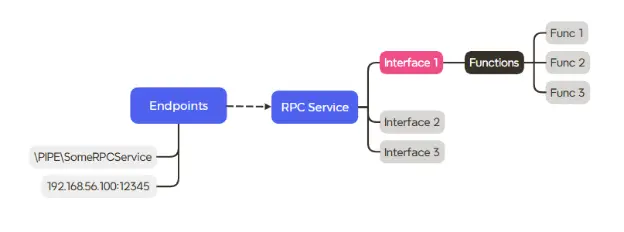
Each service exposes its functionality through one or more endpoints that can be accessed over PIPE, TCP or ALPC. We wanted to examine those available in TCP and PIPE, because both can be accessed remotely.
Also, each service may have a single RPC interface or multiple RPC interfaces, and each one of those has multiple functions that can be called. In order to call a function, you first need to “bind” the interface that exports it. Binding an interface simply means we get a handle to the interface, and this handle can be used to call functions that the interface exports.
NOTE: The fact that a service exposes a TCP endpoint does not necessarily mean that we can bind to all of its interfaces remotely. Interfaces can be configured to disallow remote connections regardless of the service’s endpoints.
Here is a simple diagram that represents the explanation above:
In order to find good candidates for remote RPC calling, there were few requirements that we wanted to keep in mind.
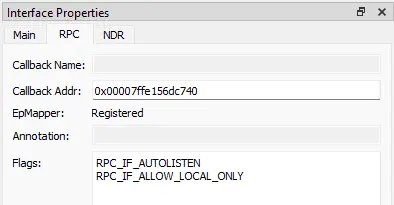
First, the interface we accessed must NOT have the flag “RPC_IF_ALLOW_LOCAL_ONLY” set, as this flag would block remote access to the interface. We were able to check this by using RPCView and clicking on the interface we wanted to use. This information could be found on the RPC tab of the Interface Properties window:
Second, we would need to pass the security callback of each interface. Each interface has a function called “security callback,” which is responsible for authorizing the user that wants to use the interface. The security callback may not exist at all.
Finally, we would need to pass the optional checks that each function may perform internally to check if the user that called it is allowed to execute certain operations.
To summarize, the ideal parameters are:
After going through a few RPC services, we stumbled upon the EventLog service, which listens for connections on a named-pipe: \PIPE\eventlog.
Because my original intent was to gather information, EventLog files seemed promising, as they contain information that we could benefit from as an attacker.
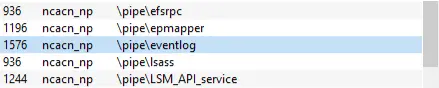
When we clicked on the service in RPCView, a table listed the interfaces under the service. For each interface, the file that implements it and the security callback address is listed.

By looking at the table and the RPC tab we mentioned earlier, we were able to see this service met two of the prerequisites: it is exported by PIPE and none of the interfaces have the LOCAL_ONLY flag.
We chose to focus on the first interface, with the universally unique identifier (UUID) of 82273fdc-e32a-18c3-3f78-827929dc23ea. Spoiler alert: this is the UUID of an RPC interface named MS-EVEN; the other one is named MS-EVEN6.
However, there were two prerequisites left: the security callback and the functions themselves. Both could be checked “on-the-fly” by simply trying to bind the interface with Impacket.
NOTE: The binding is not mentioned explicitly below, but in order to call the function we did bind the interface. The whole process is not that exciting, so we have not included the details here. However, one step is crucial: when binding an interface, whether or not it is documented, you should know which authentication-level the service expects. Otherwise, you may get “access denied” from the security callback when trying to bind the interface, even if you have the right credentials. You may have sufficient privileges to access an interface and still get access denied upon trying to bind it.
Before going further, we wanted to know if the interface was already documented. If not, we would need to reverse engineer the dynamic link library (DLL) that implements the interface. After a quick search, we found Microsoft’s documentation of the protocol for the MS-EVEN interface and skimmed through its functions. Few of them seemed interesting because they expected a user-supplied file path as one of their arguments, specifically ElfrOpenBELW and ElfrBackupELFW. After reading about each of those functions in the documentation, we decided to focus on ElfrOpenBELW.
Since opening files remotely as an unprivileged user sounds like a powerful ability, even if for a dedicated purpose, we decided to try and open a file ourselves. We wanted to understand which files exactly could be opened and what else we could do with them once we opened them.
The function signature looks like this:
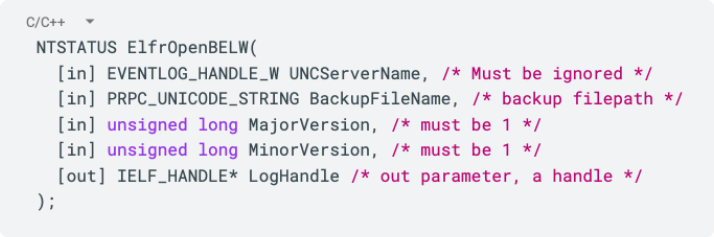
Although it seems like a lot of parameters, many parameters are usually optional and are not relevant for the default purpose of the function, as is the case with many other API functions in Windows. Same here, except for the backup filepath, the other fields are ignored or set to constants.
We wrote a small Impacket script to interact with the service. Luckily, the protocol was already implemented by Impacket, so we didn’t have to go through the process of constructing the different MSRPC Network Data Representation (NDR) structures myself.
After passing a file path to a random event log (EVTX) file that was present on the remote computer (the one that we were calling the RPC function on), we unfortunately got a `STATUS_ACCESS_DENIED` error.
After getting the ACCESS_DENIED for the specific file we tried, we tried others but still got the same error. We decided to try files other than EVTX files, but got an STATUS_EVENTLOG_FILE_CORRUPT (0xc000018e) error.
When we considered this error, we realized it meant more than just that the file was corrupted. If a file is corrupted, it also means that it exists. As a result, the service had given us a way to check the existence of files and directories (in any format) in C$. This was an ability that we should not have as a low-privileged user. Interesting! We quickly began to verify.
We tried to open a non-existent file and a directory, and got a STATUS_OBJECT_NAME_NOT_FOUND (0xc0000034) and a STATUS_FILE_IS_A_DIRECTORY (0xc00000ba) error code, correspondingly.
We had a way to check the existence of files and directories in the C$ share as a low-privileged user. Listing installed programs and discovering previously logged-in users were some of the implications.
This is the first problem in the implementation of MS-EVEN and our first primitive: a hidden CreateFile primitive.
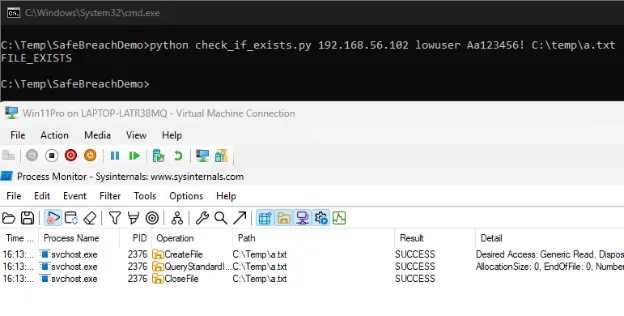
The CreateFile happens on behalf of the EventLog service: C:\WINDOWS\System32\svchost.exe -k LocalServiceNetworkRestricted -p -s EventLog
NOTE: If you are familiar with the different potato techniques, you may think that we could leverage this already. Unfortunately, the service impersonates the user that called the action, and even if we could somehow trick the service to authenticate against us without any impersonation, the fact that the service runs as a LOCAL_SERVICE account would make it authenticate anonymously.
So, while we’d found a way to check if a file exists or not, we didn’t get a valid handle because we couldn’t access any of the remote EVTX files. We needed a valid handle in order to use other functions like ElfrBackupELFW, so we needed to solve this problem.
If we couldn’t open a file on a remote machine, it seemed like there were no files that our low-privileged user on the remote machine could access. But if we could make the remote machine open a remote file, instead of a local file, then we could set the remote file’s permissions to fit my privileges and remove the ACCESS_DENIED error.
In addition to the target computer offering the MS-EVEN RPC interface and the attacker computer running with the unprivileged user, we set up a third Linux machine and launched Impacket’s SMB server with the following command-line:

This Impacket share is permissive and allows even anonymous users to authenticate against it and read its contents. So, it seemed perfect for our goal. We took a benign EVTX file and stored it inside the share, then we tried to open it using the ElfrBackupELFW and…success. We got a valid handle and could continue to experiment with the ElfrBackupELFW function.
The ElfrBackupELFW function accepts a file path and a handle. Its signature looks like this:
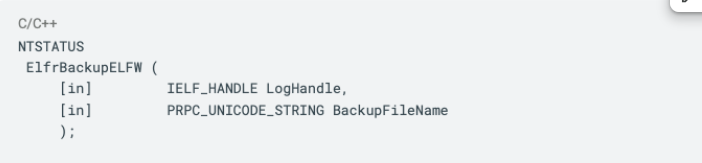
The first argument is the file we opened previously, and the second one is, as the official documentation tells us, a path where the backup to the file we opened will be saved. As you can tell, this is an ‘in’ param, which means the location is specified by the caller.
Next, we tried to backup a valid EVTX file. We pointed the function to a writable location by setting the second argument to an accessible path, while supplying the handle to the file we opened on my Kali-hosted EVTX and…success again!
We basically copied a file from a remote share on a Kali machine to a remote location. This means we could “backup” (essentially write) files from our SMB share to a remote location that is writable by the low-privileged user!
We started to play around with the EVTX that resided in our share and discovered that as long as the header was correct, we could basically write any data inside the EVTX file and copy it to the remote location. This was huge, because we now had a half-baked writing primitive to a remote location, which requires a low-privileged user—this was essentially a bypass to the default C$ limitations.
But we weren’t finished yet. The current write primitive allowed us to write a file to an accessible location somewhere in C:\, but could we achieve code execution through this? Let’s see. The file should have a valid EVTX header, so we couldn’t write whatever we wanted, but we could write something in the middle of it. This led us to brainstorm different ideas about ways to execute code automatically, just by dropping a file to some specific location.
Theoretically, given an arbitrary write primitive, how could we execute code automatically or semi-automatically? Below are some options we came up with:
We chose option three because it was the most convenient for a proof-of-concept (PoC), and the fact that it belongs to the user ensures that the location will be writable using our current permissions. So, it felt perfect for our use-case.
Remember, we couldn’t control the entire file. We must include a valid header in order to open the file, otherwise we would get a STATUS_EVENTLOG_FILE_CORRUPT.
Hypothetically, if we had an interpreted language that executed code line by line and ignored errors, we probably could have dropped a newline character somewhere in the EVTX, followed by malicious code, and the code could have run.
In Windows, this is essentially a batch file – a plain-text script that contains commands for the Windows command-line interpreter. If we could place a batch file in the Startup folder, it’s game over. Batch files are executed line-by-line and invalid lines do not interfere with the other lines. Pretty perfect for our use case.
Unfortunately, after a few attempts, we saw that a valid EVTX header contains null-bytes, and apparently this terminates the “file read” when the interpreter loads the file. We tried to search for another format that the null-byte wouldn’t interfere with but could not find something vanilla enough (as in, installed by default). Instead, we started to investigate how the backup itself happens.
We assumed the process consisted of opening a handle to a file, with a check for the header validity happening somewhere, then we could ask to back up the same file, and then it would be written to the path we specified. We also assumed a handle to the file would only be released when we closed the connection; therefore, we couldn’t interfere with the file while it was being used by the Eventlog service.
Unless…
As the team brainstormed, we understood our mistake! We were not using a regular, local EVTX file—we were using a remote share in a Kali machine. Therefore, we could interfere with the file however we wanted! And, if the validity check happened only once…maybe we could achieve a Time-of-Check to Time-of-Use (TOCTOU) vulnerability.
We assumed the logic behind the scene was something along the lines of:
If the second ReadFile did not check the validity of the header, we may be able to achieve arbitrary write.
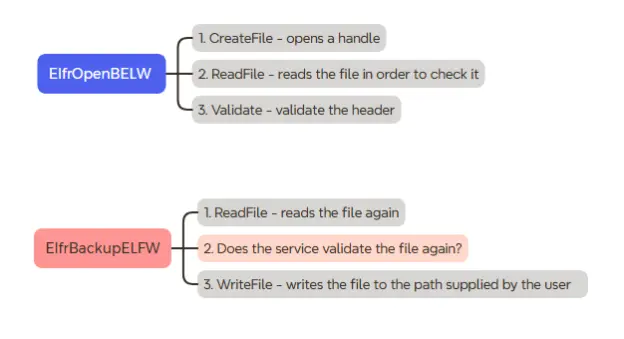
We fired up Process Monitor. We wanted to check if the flow we created was correct.
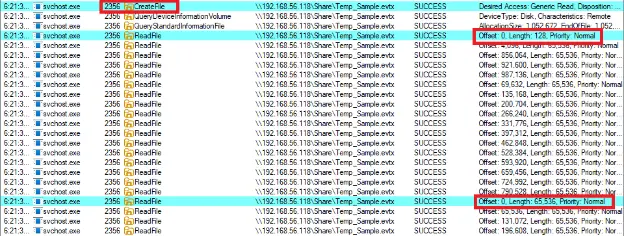
Look at that! There was a CreateFile, which happens only once, then there was a ReadFile, which reads exactly 128 bytes from offset 0. This must be the header and, after the backup operation, there is a second ReadFile that reads AGAIN from offset 0 with the full length of the file and not just the header! This indicates that there is a huge chance that the check happens only on the read and not on the backup!
So, theoretically, if we could change the file after the opening but before the backup operation, we would pass the validity check and could write arbitrary files.
We wrote a script that would do the following using Impacket:
We ran the script and…viola! We managed to copy an arbitrary file to a remote location on the machine using a low-privileged user!
Remember the “Back to Basics” list from before? Well, we checked two of the options and found both to work. We managed to achieve code execution by:
The first method is not new; we managed to write a batch script to the user’s Startup folder, and the remote machine executed it the next time the user logged-in!
The demo below demonstrates writing a batch script that opens calc.exe upon user login; this is achieved by writing the batch script to the Startup folder of the user.
The second method involves (missing) DLL hijacking. We\ used HijackLibs in order to find a good candidate—a path that was accessible for low-privileged users—and found that OneDrive has such a path per user profile. After writing a malicious DLL to this folder, it will be loaded in the next OneDrive startup and will run my code.
On a normal Windows machine, there are multiple places to which low-privileged users are able to write. These paths include folders like C:\ProgramData, which are used by all users and are, therefore, accessible for everyone. However, during our research, we noticed an overlooked problem.
One of the challenges we found once we achieved the ability to write files remotely with our low-privileged user, was to understand where such a user could write files to, on a remote machine.
In a domain network, the group “Users” contains all the users in a domain, which means that if you have a low-privileged user—whether it’s your user or someone else’s credentials that you stole—you have the proper permission to write to a variety of beneficial paths on ANY remote machine in the domain. This is HUGE! Why? Because it really lowers the bar for a beneficial lateral movement attack vector.
Given a remote file write primitive with your own permissions, you can write into ANY machine in the domain that has a directory that contains the group “Users.” This essentially means that you, as a low-privileged user, can write into the domain controller machine with just YOUR credentials if there is a directory that contains the group “Users.” This opens up a lot of new attack vectors—and not just code execution.
The demo below demonstrates the ability to write into the ProgramData folder of the domain controller using a low-privileged user.
Remember the recon ability we developed earlier? Well, the Program Files directory is accessible for the Users group. So, we essentially have a way to list installed programs on ANY machine in the domain using low-privileged credentials and, in some cases, even our own credentials.
The demo below demonstrates the ability to use a low privileged user and one of the vulnerability “components” to check if Wireshark is installed on the remote computer (the Domain controller in this case) without knowing the credentials to the remote computer.
This strategy as a whole, opens up a new way to propagate in domain networks, and also a new way to recon and gain information on remote targets. While the TOCTOU vulnerability was patched in May 2025, the recon abilities are still open and won’t be patched by Microsoft.
When it comes to our original research, SafeBreach is deeply committed to responsible disclosure. In line with that commitment, we reported the vulnerability to Microsoft in February 2025. As an RCE vulnerability in Active Directory domain networks, it was assigned CVE-2025-29969 and was patched in May 2025.
This research set out to explore how a malicious actor might exploit RPC protocols as an attack vector to gather data remotely as a low-privileged user. Along the way, we discovered an RCE vulnerability in Active Directory domain networks (CVE-2025-29969) with a method to write arbitrary files remotely over the MS-EVEN RPC service of Windows using a low-privileged set of credentials, effectively bypassing the default C$ share limitations. Because this vulnerability exists in the MS-EVEN service, which is enabled by default on both Windows 11 and its server variant Windows Server 2025, the potential impact is far-reaching.
To help mitigate the potential impact of the vulnerabilities identified by this research, we:
For more in-depth information about this research, please: